Week 2 - Previs
Notes from Mentors:
-
Simplify shot 3 (the flower shot), focusing on macro photography
-
Consider the transitions and flow between the shots
-
Consider reordering shots based on what would conceptually make the most sense
-
Think about the color palette and make sure the colors are cohesive throughout
Our pitch deck
Team To-Do List:
-
Rework shot 3 - focus on minimalism and macro shots
-
Create CG Previs for each shot - pay attention to flow of camera
-
Create initial models and shaders for all assets
-
Look at color palette across the commercial
Personal To-Do List:
-
Create FX Previs for shot 4 (cloth)
-
Work with Wren to set up camera for shot 4
-
Help create concepts for shot 3
Shot 3:

Gemini AI generated concepts for the flower shot

Our contact sheet for the new cloud shot
After running through many different options for alternative flower scenes, and being dissatisfied with all of them, we decided the best course would be to switch to a different concept. Instead of flowers, this shot will take place in the clouds. The ring will fall through the stormy clouds into a bright, sunny scene with soft white clouds, connecting to the rings ability to track stress levels.

Screenshot from an initial camera test for the cloud shot

Initial FX test for clouds
Camera transitions:
We drew inspiration from Oura Ring ads when planning our camera transitions. In official ads, the transitions feel natural because even when the location and context of the ring is changing, the general movement stays the same. If the ring is falling vertically in one shot, it will be falling vertically in the next shot. Similarly, the position of the ring on screen remains close to the same.
One of the main ads that we drew camera transition reference from
Shot 4 FX Tests:
Most of my time this week was focused on creating previs for shot 4. In shot 4, the ring falls into a cloth and rolls around for a few seconds. Then, the cloth is pulled taut, and the ring is launched upwards to transition into the next shot.
Cloth Fall vs. Cloth Launch:
Unfortunately, when the cloth is set up to look how we want it to for shot 4, it stretches too much to launch the ring when it is pulled taut. To launch the ring, the cloth has to be stiffer, with a lower poly count-- but then, it doesn't have enough movement or folds to look good for the beginning of the shot.
After testing out many different settings on vellum, I decided to do separate simulations for each part of the shot, and then merge them together. The beginning of the shot, with the ring falling into the cloth, is one simulation, and then when the cloth is pulled taut, the ring switches to a different simulation, in which the cloth is stiffer, and the ring is launched upwards (the cloth keeps the same vellum settings throughout)
The combination of multiple simulations worked well! It ended up actually being 3 different simulations :
-
The ring falls into loose fabric, which is pulled taut (the ring does not launch)
-
The ring falls into stiff fabric, which is pulled taut, launching the ring
-
Loose fabric simulated on it's own without any interaction with the ring
Final Combination: The first simulation of the ring and loose cloth is used for the beginning of the shot, and then when the ring is launched up, the ring switches to be the ring from the stiff fabric simulation, and the fabric switches to be the loose fabric on its own

FX test from last week of the ring in moving cloth

Very early previs of shot 4, with a hand animated ring launch
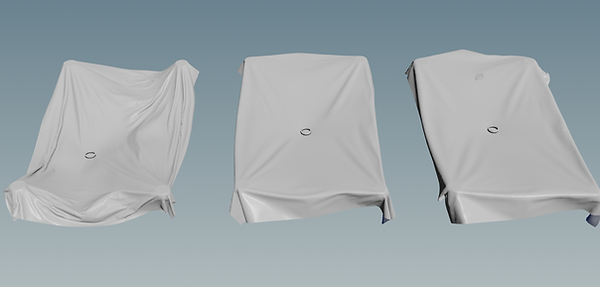
Different settings and stiffnesses tested for the cloth FX

Previs node tree for switches between different sims

Previs test of the ring falling in cloth and being launched

Previs of ring in cloth with colors applied and initial camera
Full team previs and presentation